Testbooks
A testbook is a portable snapshot of a project: a set of predefined tests, mostly built around one topic, that you can deploy into your own account in a few clicks. Sipfront ships a number of ready-made testbooks so you don't have to build common test scenarios from scratch — you just pick the target, credentials and agents to use, and you end up with a project containing all of that testbook's tests, ready to run.
Secrets never travel with a testbook, and anything account-specific (targets, credential sets, agent pools, ...) is stripped out on export and asked for again when you convert the testbook into a project. You can also export any project of your own as a testbook, to carry it into another project or account, or to reuse it as a template later.
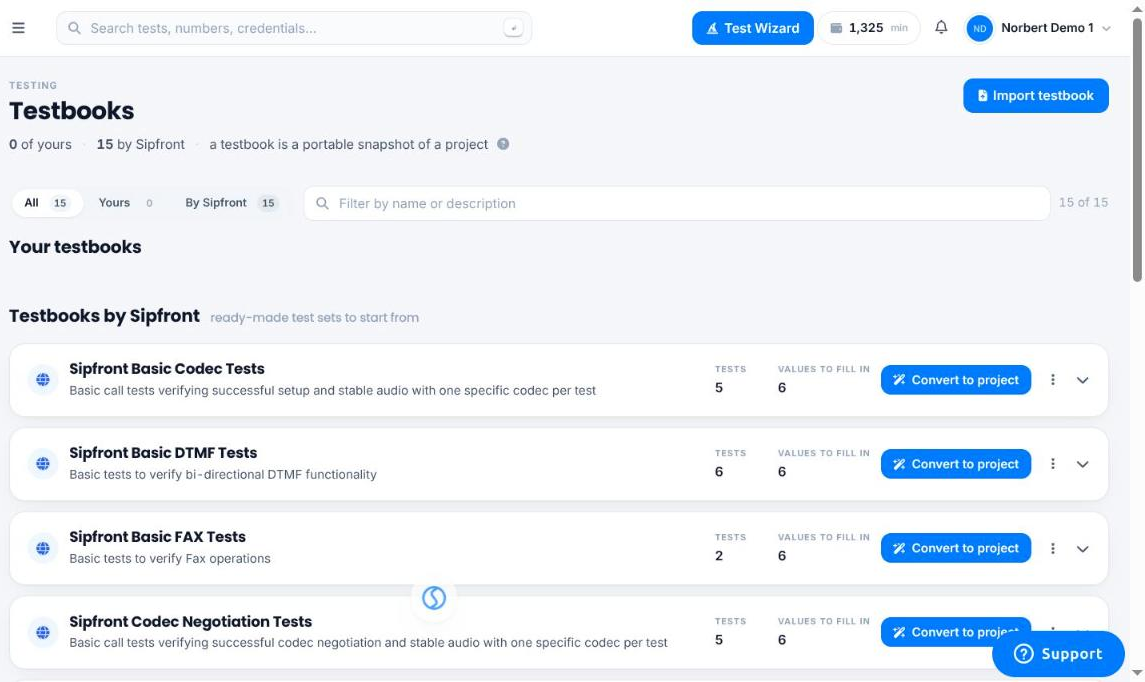
Where to find them
Testbooks live under Account > Testbooks. The page lists your own testbooks (exported from your projects) alongside the ones Sipfront provides under Testbooks by Sipfront. Expanding a testbook's row shows the tests it contains; each testbook also lists how many tests it has and how many values you'll need to fill in to convert it.
Converting a testbook into a project
Click Convert to project on a testbook to start the wizard. It walks you through a handful of steps, skipping any step that doesn't apply to the testbook you picked:
- Project — create a new project for the tests, or add them to an existing one.
- Target Systems — map every target system the tests use to one of your own.
- Agent Pools — map every agent pool the tests use to one of your own.
- Credentials — map every credential set the tests use to one of your own.
- Notifications — optionally map notification integrations and callback templates.
- Test-Specific Data — fill in any remaining test-specific parameters, such as dial destinations.
- Conditions — review test condition values that depend on your credential mappings.
Each value to fill in shows which tests it's used in and, where it applies, whether it's used as the caller or callee side of the call. You can pick an existing resource from a dropdown, or use Quick Create to provision a new target, agent pool or credential set right there in the wizard.
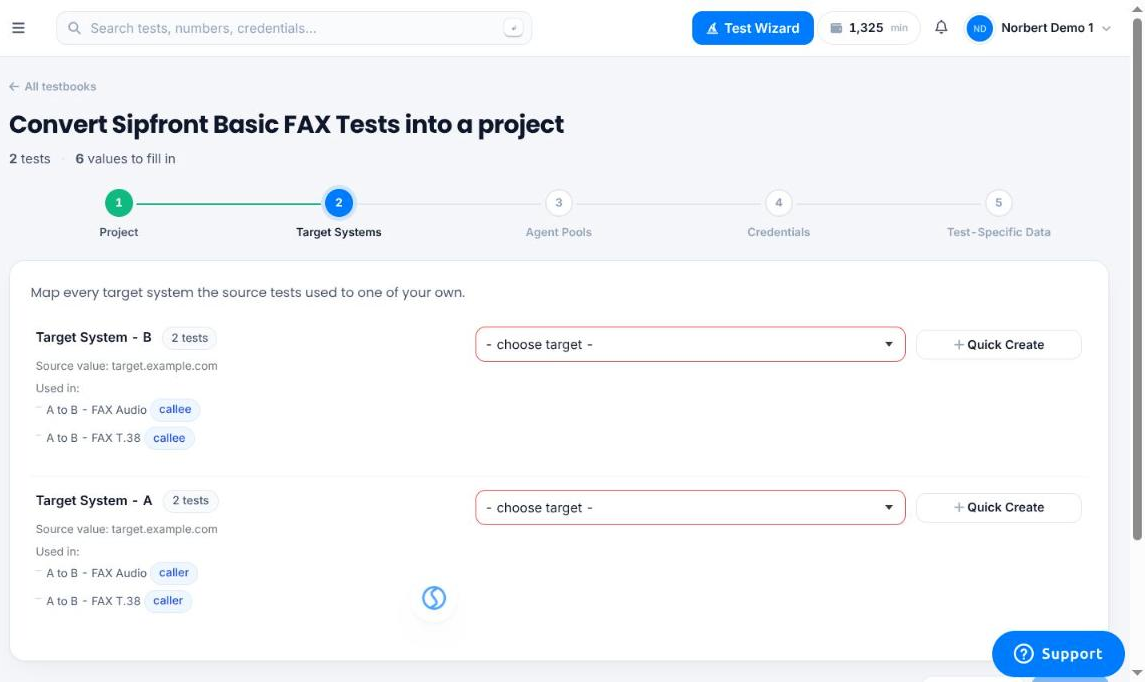
Once every required value is filled in, submitting the wizard creates the project and its tests, ready to run.
Testbooks by Sipfront
- Sipfront SIP Basic Tests
A small set of SIP tests including DTMF as well as FAX calls - Sipfront WebRTC Basic Tests
A small set of WebRTC tests including WebRTC to WebRTC calls as well as WebRTC to SIP calls - Sipfront Basic Codec Tests
Basic call tests verifying successful setup and stable audio with one specific codec per test - Sipfront Basic DTMF Tests
Basic tests to verify bi-directional DTMF functionality - Sipfront Basic FAX Tests
Basic tests to verify Fax operations - Sipfront Hold, Consultations, and Transfers
Call tests verifying connectivity and audio during call hold, consultations, and call transfers - Sipfront Codec Negotiation Tests
Basic call tests verifying successful codec negotiation and stable audio with one specific codec per test